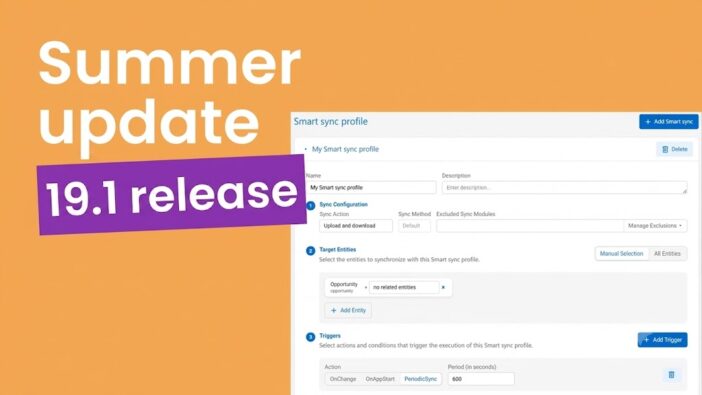
Resco 19.1 is now available, released on June 8.
This Summer Update brings new capabilities to help you build smarter, faster, and cleaner mobile apps, with better performance in large forms and more control over data refreshes in low-connectivity conditions.
Key updates at a glance:
- Smart sync – the granular sync optimization tool that solves the most painful connectivity use cases.
- Pages – the structuring tool that splits large mobile forms, shrinks form load time, and improves navigation.
- Table view – a compact layout for displaying groups of related assets together that stops lengthy scrolling through a form.
Let’s look at what’s new in detail.
Updates for Resco Mobile Platform
Smart sync: Refresh only the data users need
Full or incremental syncs slow down field users working in areas with limited connectivity. Smart sync lets them refresh only the critical data they need for the job, such as work orders, asset lists, or another specific data set, in a few seconds.
Administrators set up smart synchronization profiles that target specific data subsets. The profiles can run when the app starts, on a schedule, or after selected client-side record changes. They can also be launched manually through commands and buttons, or programmatically through JavaScript. Smart sync profiles are set up in the App configurator.
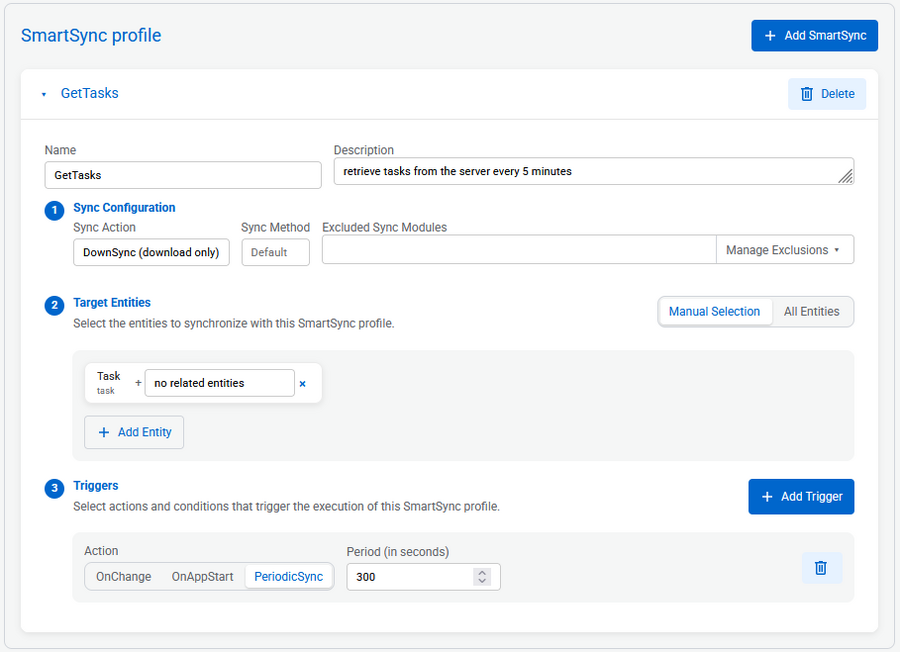
Smart sync is not a replacement for regular full / incremental synchronization. It is an optimization layer for scenarios where targeted data refreshes make more sense than syncing everything.
Read the full documentation on Smart sync or watch the demo in our latest 19.1 release webinar.
Pages: Structure complex mobile forms
Larger mobile forms can quickly become difficult to read and run into performance issues, especially when they contain many tabs, related lists, or hidden iFrames.
The new Pages system helps app makers split and organize forms into clearer, workflow-based pages that reflect the real workflows of field users.
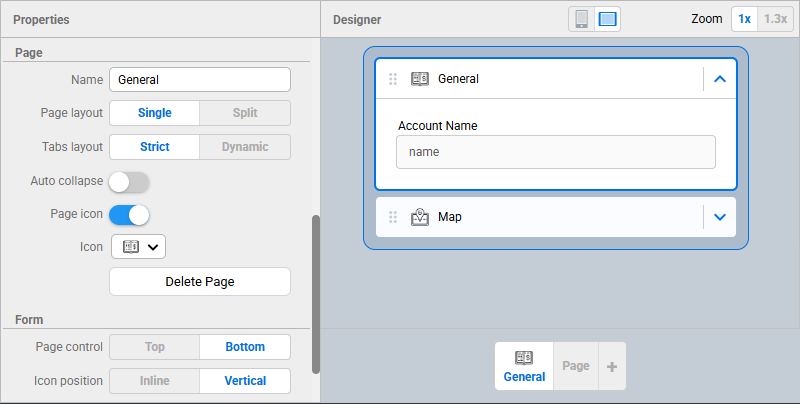
Splitting forms into separate Pages improves form performance because data loads in smaller portions – each page loads when the user progresses through the form. Field users on mobile devices experience faster form loading and better navigation. You can use the Pages system in the form designer in App Configurator.
Note: Existing forms remain backward compatible: their layout stays the same in the mobile app after upgrading, while the designer shows you the new Pages system for future adjustments.
Read more about the Pages system in our release documentation, or watch the demo in our latest 19.1 release webinar.
More Resco Mobile Platform improvements in the 19.1 release:
- Live preview mode update
In the original release of Live Preview mode, we only supported forms & views. From now on, Live Preview mode is also enabled for calendar, dashboard, scheduler, map & route plan components. Preview your changes immediately and build more comfortably.
Read more
- App configurator: Synchronization configuration tab
Synchronization settings are now grouped in one dedicated area, making advanced sync options easier to find, configure, and understand.
Read more
- Improvements to rules error reporting
Rule failures now show more detailed information, including the approximate line, failed step, exception message, and record context, helping app makers troubleshoot faster.
Read more
Updates for Resco Forms
Table view: Display repeatable groups on the same card
When users need to enter the same information for many similar items, having the input fields spread across different parts of the form makes the work long and tedious.
The new table view displays repeatable groups of questions on the same card under a single header, making it easier to enter data and reducing the time spent scrolling.
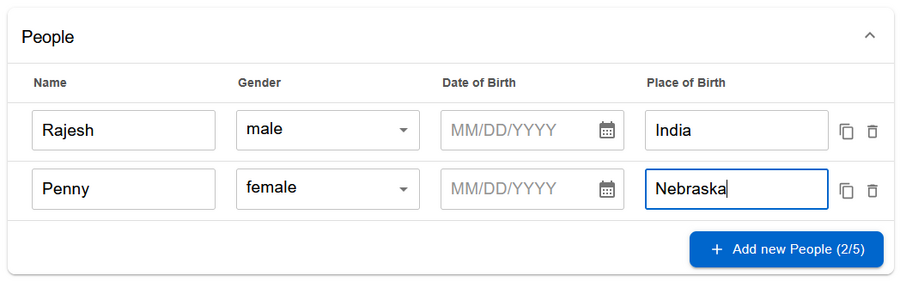
You can set up a simple “Table” vs. “Cards” toggle in the Designer. App makers can transform existing repeatable groups into this high-density table view with a single click, without needing to rebuild forms, change underlying logic, or remap data.
Read more
Barcode scanning
We know that end users struggle with slow and inconvenient ways of collecting long and complicated numbers or IDs during inspections. Barcode scanning makes data entry much easier, quicker, and helps eliminate errors.
You can set up barcode scanning as the data entry method for multiple question types: text, number, URL, email, and lookup. The standard scan fills in a value, and the lookup scan fills in a value and finds the right record in the database. This helps field users connect a physical item in front of them with its digital record, without searching through lists or typing complex IDs by hand.
Read more
Preview mode in Form Designer
The new Preview mode lets app makers test forms directly in Form Designer.
Instead of saving, publishing, and opening a separate app to check how a form looks and behaves, they can now click Preview and see the form in the Designer’s central pane. From there, they can interact with it as an end user would, fill in fields, and test smart rules, such as showing or hiding questions based on previous answers.
Read more
More improvements in Resco Forms in 19.1:
- Rating question type
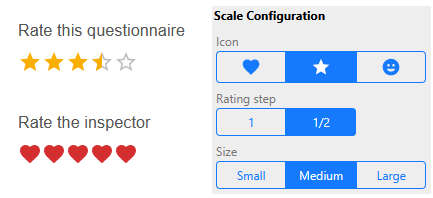
The new Rating question type lets field users rate questions with stars, emojis or hearts.
- Slider view for Number questions
The new Slider view lets users choose numeric values by dragging a handle along a scale, making number input faster and more intuitive on mobile devices.
- Cover card configuration
Cover card configuration gives app makers a simple way to add an introduction, instructions, branding, and an optional table of contents before users start filling out a form.
- Dynamic lookup filtering
Cover card configuration gives app makers a simple way to add an introduction, instructions, branding, and an optional table of contents before users start filling out a form.
Read the full documentation of the 19.1 Release on Resco Wiki or watch the demos shared during our latest release webinar.
Summary
With each release, we improve the tools you build with. In Resco Mobile Platform, we’ve added Smart sync – a precise tool for configuring synchronization profiles for field users that sync selected, critical data sets. Another update is the new Pages system in the mobile forms designer, which lets you split large forms into separate pages, improving load time and navigation.
Resco Forms is getting new building blocks for form design: a table view for repeated asset groups, barcode scanning, rating questions, slider questions, and a form preview. Together, they extend the already flexible form design options Resco Forms offers.